When "Simple" Isn't Simple: Scheduling Long-Running Jobs in GCP with VPC Service Controls
Introduction
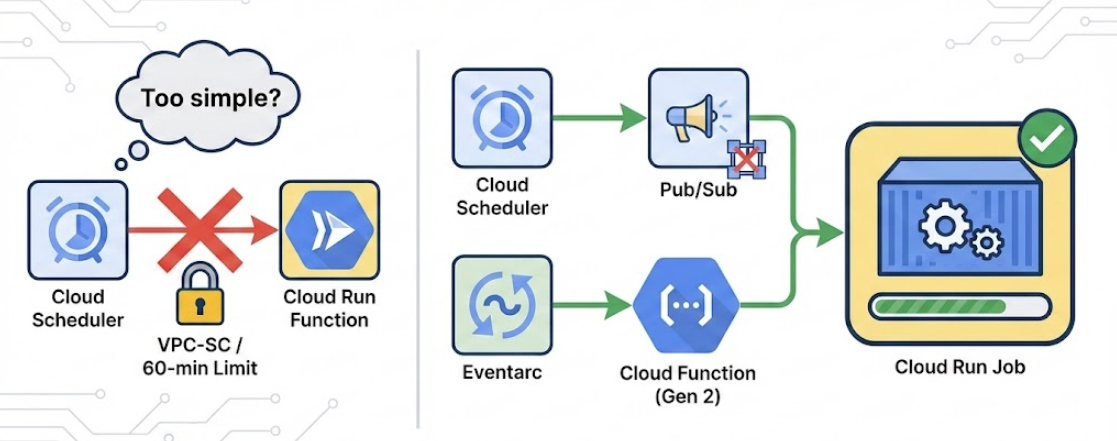
Sometimes over-engineering isn't over-engineering — it's the only way forward. Or so I thought.
This post walks through a real problem I hit in a GCP Trusted Research Environment (TRE) and the convoluted pattern I initially ended up with after security, runtime, and platform constraints all collided. Then I discovered I'd been overthinking it.
The Goal
On paper, the requirement looked straightforward. We needed a scheduled process in GCP that would:
- Scan multiple projects inside a TRE
- Identify inactive users' home disks
- Create archive snapshots
- Persist restore metadata to Cloud Storage
- Run safely under strict regulatory and security controls
It was just routine maintenance — nothing exotic. In practice, each of these constraints mattered far more than expected.
Step 1: The Obvious Design (That Didn't Work)
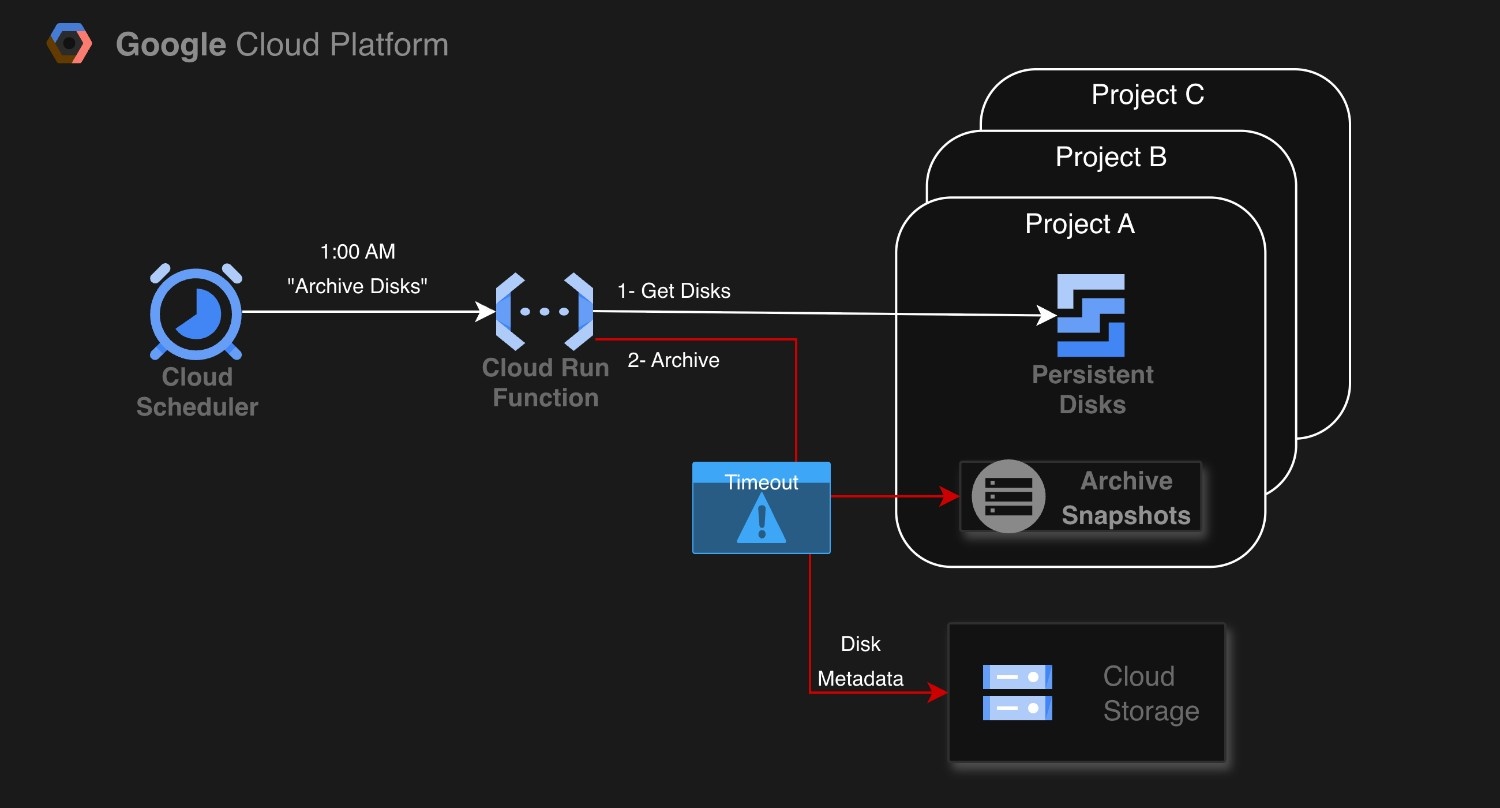
The first design was the most natural one: Cloud Scheduler → Cloud Run Function. Scheduler triggers a function, the function scans disks, archives what's inactive, and exits. Two problems appeared almost immediately.
Execution time
Cloud Run services and functions have a 60-minute execution limit. Disk archival, however, is slow by nature:
- Multiple projects need scanning
- Each project may have many disks
- Snapshots and metadata generation add more time
Some runs crossed the time limit and failed part-way through. Partial execution wasn't acceptable, so this approach had to go.
Step 2: Moving to Cloud Run Jobs (Problem Solved… Almost)
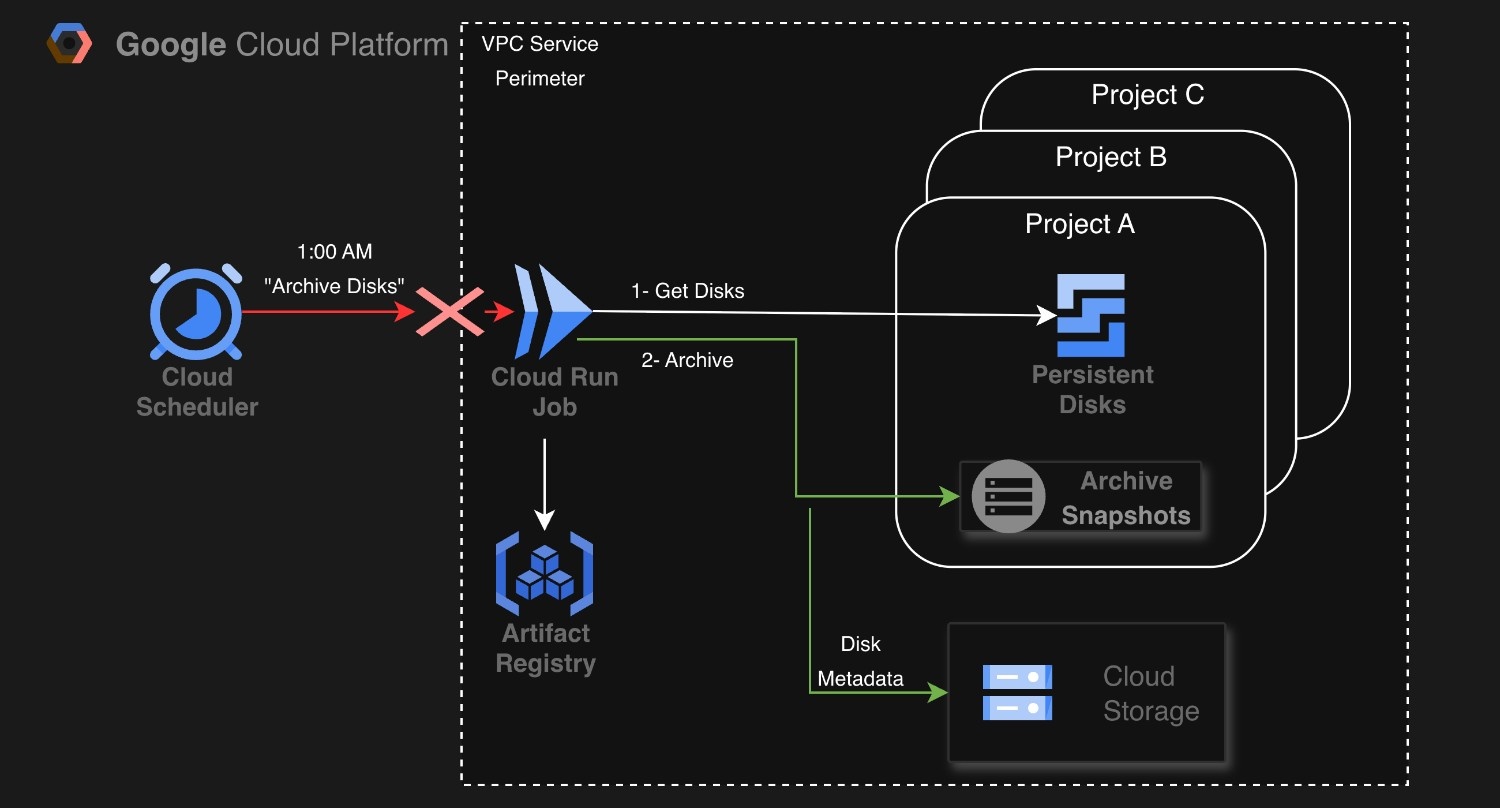
The execution-time problem had an obvious fix: move the logic into a Cloud Run Job. Unlike services/functions, Cloud Run Jobs can run up to 24 hours and can invoke containers directly. I packaged the code into a Docker container and ran it as a job instead of a service. This immediately solved one major issue:
- One-off execution model
- Up to 24 hours of runtime
At this point, the architecture became: Cloud Scheduler → Cloud Run Job
Which looked perfect — until it wasn't.
Step 3: VPC Service Controls Enters the Chat
All of our projects live inside a VPC Service Controls (VPC-SC) perimeter, which blocks unauthorised HTTP-based API calls from services running outside the perimeter. That introduced two more constraints:
- Cloud Scheduler runs outside the perimeter and uses Pub/Sub or HTTP triggers
- Unlike Cloud Run Services/Functions, Cloud Run Jobs have no HTTP endpoint
This broke the design in multiple ways:
- Scheduler couldn't make HTTP calls into protected resources
- Cloud Run Jobs can't be invoked over HTTP anyway
- Adding ingress rules would undermine the whole security model
At this point, "just schedule the job" was officially dead.
Step 4: The One Thing That Can Cross the Boundary (Or So I Thought)
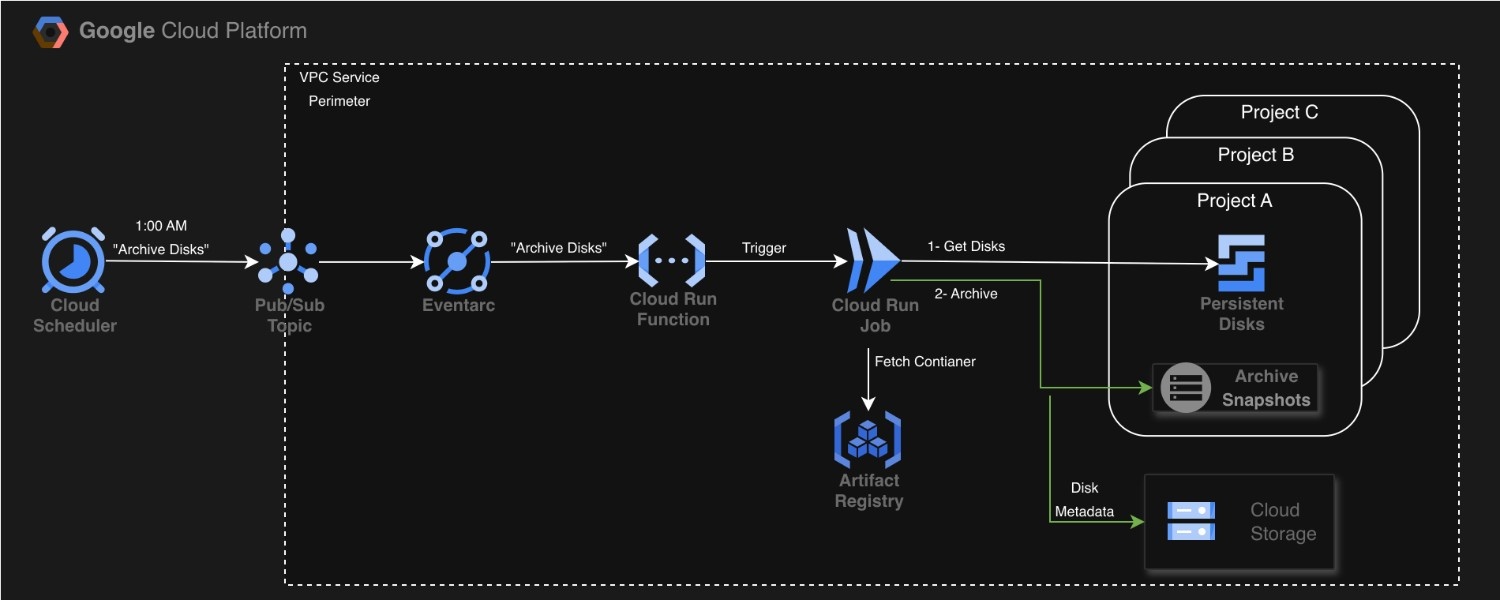
This is where I thought I needed Pub/Sub to cross VPC-SC boundaries. I built an entire chain:
- Cloud Scheduler → Pub/Sub
- Pub/Sub → Eventarc
- Eventarc → Cloud Function (Gen2)
- Cloud Function → Cloud Run Job
I convinced myself this was necessary because: - Pub/Sub is designed to cross VPC-SC boundaries - Gen2 functions need Eventarc for Pub/Sub delivery - Cloud Run Jobs have no HTTP endpoint
The architecture looked sophisticated. It had multiple components. It felt "correct."
Step 5: The Moment I Realized I'd Over-Engineered
Then I stumbled across this Google documentation:
"Cloud Scheduler can invoke HTTP targets with OIDC authentication tokens."
Wait. What?
Turns out, Cloud Scheduler can directly invoke Cloud Functions with HTTP + OIDC authentication. No Pub/Sub. No Eventarc. Just:
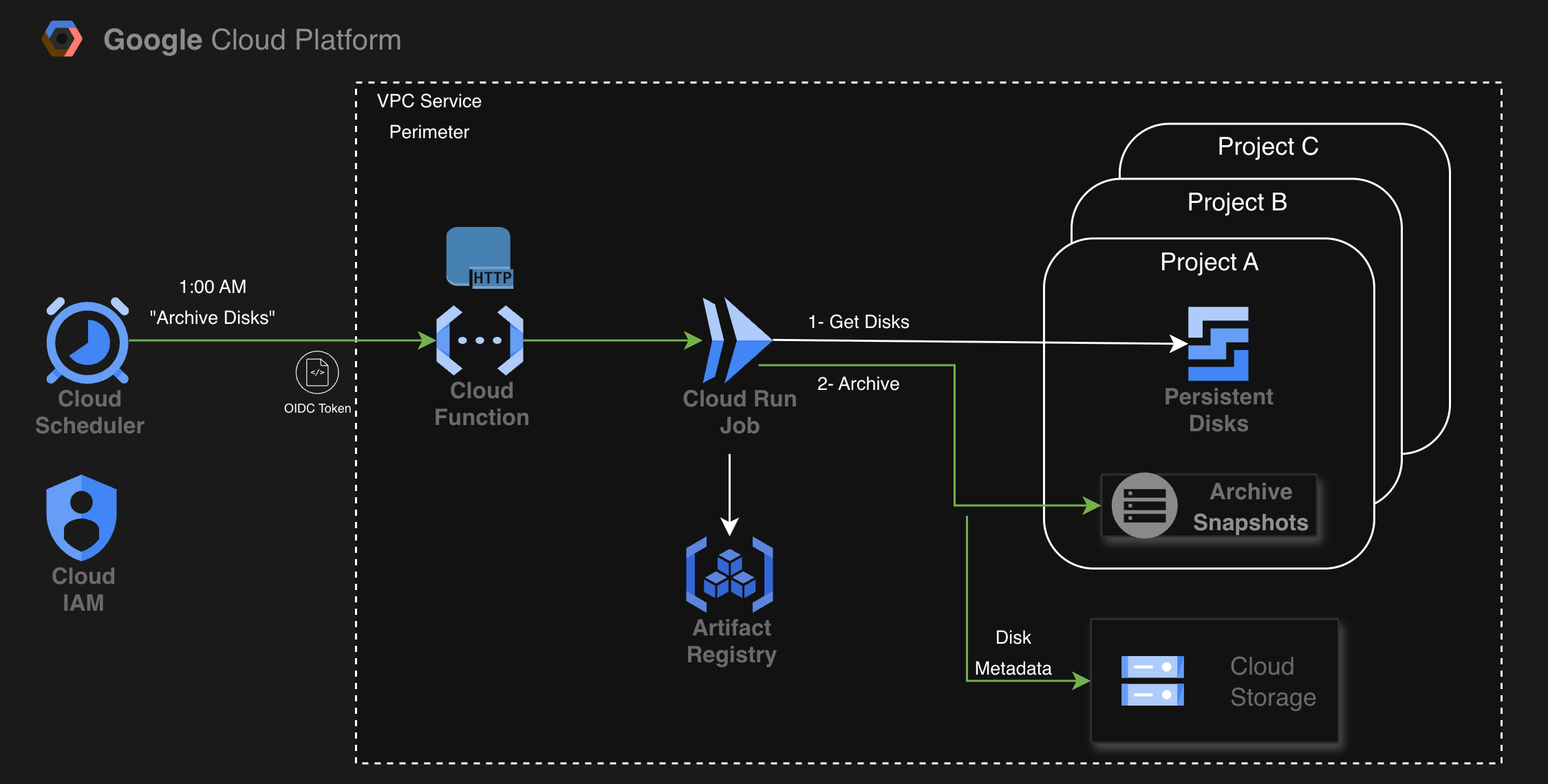
The simplified flow
- Cloud Scheduler triggers the function via HTTP with OIDC token authentication
- Cloud Function receives the request and calls the Cloud Run Jobs API
- Cloud Run Job executes the long-running archival process
What I learned
VPC Service Controls doesn't block authenticated HTTP requests with OIDC tokens. The key was proper authentication, not switching protocols.
All I needed was:
1. A Cloud Function with ingress = "ALLOW_INTERNAL_ONLY"
2. Cloud Scheduler configured with an oidc_token block
3. IAM binding granting roles/run.invoker to the scheduler's service account
That's it. No Pub/Sub. No Eventarc. Just direct HTTP invocation with proper authentication.
The Real Lesson
The original pattern wasn't wrong — it worked. But it was solving a problem I didn't actually have.
I'd assumed that: - VPC-SC blocks all HTTP from outside the perimeter → False (with proper auth) - Pub/Sub is required to cross boundaries → False (OIDC works) - Gen2 functions need Eventarc for events → True, but I didn't need events
The mistake wasn't technical — it was architectural. I'd researched Pub/Sub crossing VPC-SC boundaries and built a solution around that capability without checking if there was a more direct path.
When to Actually Use the Complex Pattern
The Pub/Sub + Eventarc pattern is useful when you need: - Fan-out to multiple subscribers - Asynchronous event processing - Retry and dead-letter handling - Decoupled event-driven architecture
But for a simple scheduled trigger? HTTP + OIDC is cleaner.
Final Architecture
# Cloud Function triggered via HTTP with OIDC
resource "google_cloudfunctions2_function" "trigger" {
  name     = "disk-archiver-trigger"
  location = var.region

  service_config {
    ingress_settings = "ALLOW_INTERNAL_ONLY"
  }
}

# Cloud Scheduler with OIDC authentication
resource "google_cloud_scheduler_job" "schedule" {
  name = "disk-archiver-schedule"

  http_target {
    http_method = "POST"
    uri         = google_cloudfunctions2_function.trigger.url

    oidc_token {
      service_account_email = google_service_account.scheduler.email
    }
  }
}

# Grant invoker permission
resource "google_cloud_run_service_iam_member" "invoker" {
  service  = google_cloudfunctions2_function.trigger.service_config[0].service
  role     = "roles/run.invoker"
  member   = google_service_account.scheduler.member
}
Clean. Direct. Secure.
The Takeaway
The best solution isn't always the most sophisticated one. Before introducing new components into your architecture, ask yourself:
- Does this solve a problem I actually have? I built an event-driven pipeline to cross a boundary that authenticated HTTP could cross just as easily.
- Have I validated my assumptions? I assumed VPC-SC blocked all external HTTP without checking if proper authentication changed the rules.
- What's the cost of this complexity? Every additional component means more configuration, more monitoring, more places for failures.
Sometimes the "engineering" part of software engineering means knowing when not to build something.
Start simple. Add complexity only when simplicity fails. And always check the docs before assuming a workaround is necessary.
tags: #GCP #CloudRun #VPCServiceControls #CloudArchitecture #Serverless #CloudScheduler #CloudFunctions #OIDC #OverEngineering #SimplifyFirst #CloudEngineering #DevOps #SecurityArchitecture #TrustedResearchEnvironment