Migrating GKE Internal Ingress to Gateway API
Introduction
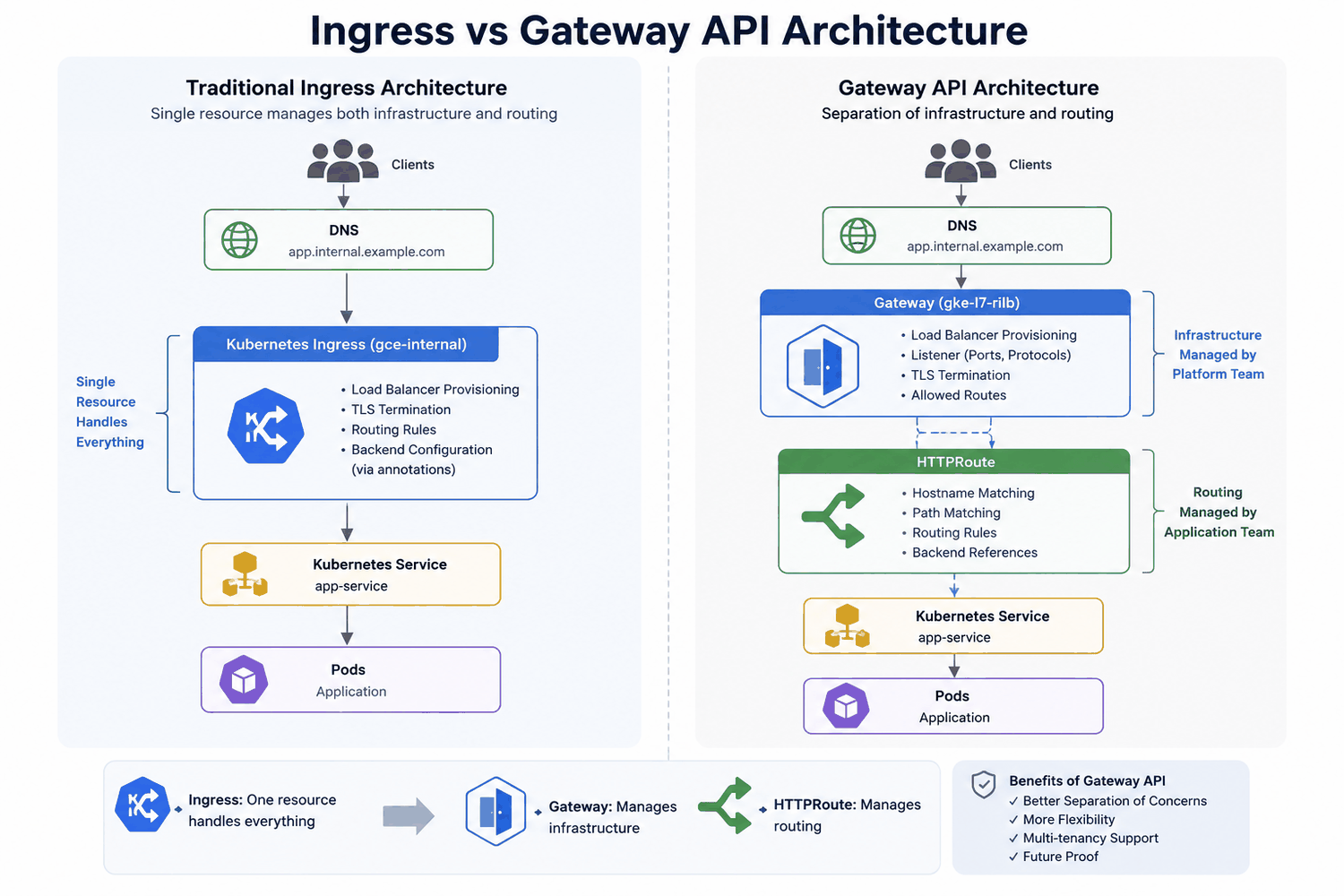
GKE internal Ingress has been a familiar way to expose private HTTP and HTTPS services inside Google Kubernetes Engine. It works, but it also concentrates several different concerns into one Kubernetes object: the load balancer frontend, TLS termination, routing rules, backend selection, and controller-specific annotations.
Gateway API separates those concerns into a clearer model:
Gatewayowns the load balancer entry point, listeners, frontend address, TLS references, and route attachment rules.HTTPRouteowns hostname, path, header, and backend routing.- Policy resources handle platform-specific behavior such as backend timeouts and health checks.
That separation is the real reason to migrate. Google recommends Gateway API for new GKE load balancing designs, especially where teams need richer traffic management, clearer ownership boundaries, or better multi-tenancy. Ingress still works for many existing HTTP and HTTPS workloads, but Gateway API is the stronger long-term model.
This article follows a conservative migration pattern for private services that already use internal GKE Ingress. The goal is not to redesign the platform during cutover. The goal is to preserve behavior first, prove the new path, and then decide whether shared Gateways or other improvements are worth doing later.
The Migration Principle
The safest migration is deliberately boring: keep the application contract the same while changing the infrastructure model underneath it.
For the first pass, preserve:
- the same application hostname
- the same path behavior
- the same internal accessibility
- the same TLS certificate or certificate source
- the same backend workload and port
- the same timeout, health-check, and security policy behavior where those settings already exist
- a quick rollback path through DNS
Only after the Gateway path is stable should you consider consolidation, shared listeners, central certificate ownership, or route restructuring.
The high-level sequence is:
- Enable Gateway API on the cluster.
- Verify the GKE and VPC prerequisites.
- Inventory the current Ingress behavior.
- Reserve a new internal frontend IP for the Gateway.
- Create the TLS Secret, Gateway, HTTPRoute, Gateway-facing Service, and required policies.
- Validate traffic directly against the Gateway IP.
- Move DNS only after validation succeeds.
- Keep the old Ingress available during the observation period, with a separate Service for the Gateway path if both controllers run in parallel.
- Remove legacy resources only after the Gateway path is proven stable.
GKE Prerequisites
Start with the cluster and network, not the YAML.
For an internal Gateway on GKE, verify that:
- the cluster is VPC-native
- the
HttpLoadBalancingadd-on is enabled - Gateway API is enabled on the cluster
- a proxy-only subnet exists in the same VPC and region
- Shared VPC IAM permissions are in place where the cluster uses a Shared VPC
Enable the Gateway API Standard channel with gcloud:
gcloud container clusters update <CLUSTER_NAME> \
  --location <REGION_OR_ZONE> \
  --gateway-api=standard
Or manage it in Terraform:
resource "google_container_cluster" "main" {
  name     = "my-cluster"
  location = "europe-west2"

  gateway_api_config {
    channel = "CHANNEL_STANDARD"
  }
}
Then confirm that the cluster exposes GatewayClasses:
The ACCEPTED column should be True for the classes you plan to use.
Common GKE GatewayClasses are:
| GatewayClass | Load balancer | IP type | Scope | Typical use |
|---|---|---|---|---|
gke-l7-global-external-managed |
Global external Application Load Balancer | Public | Global | Public websites and APIs |
gke-l7-gxlb |
Classic global external Application Load Balancer | Public | Global | Legacy external load balancer patterns |
gke-l7-regional-external-managed |
Regional external Application Load Balancer | Public | Regional | Regional public applications |
gke-l7-rilb |
Regional internal Application Load Balancer | Private | Regional | Internal applications and private services |
For internal GKE Ingress replacement, the usual GatewayClass is gke-l7-rilb. It provisions a regional internal Application Load Balancer with a private frontend IP.
Proxy-Only Subnet
Regional internal Application Load Balancers require a proxy-only subnet. The Gateway frontend IP does not come from this proxy-only subnet; it is the forwarding-rule virtual IP. The proxy-only subnet is used by Google-managed load-balancer proxies inside the VPC.
The proxy-only subnet requirement depends on the load balancer family:
| GKE resource | Google Cloud load balancer | Proxy-only subnet required? |
|---|---|---|
External Ingress with gce |
Global external Application Load Balancer | No |
Internal Ingress with gce-internal |
Regional internal Application Load Balancer | Yes |
Gateway gke-l7-global-external-managed |
Global external Application Load Balancer | No |
Gateway gke-l7-gxlb |
Classic global external Application Load Balancer | No |
Gateway gke-l7-regional-external-managed |
Regional external Application Load Balancer | Yes |
Gateway gke-l7-rilb |
Regional internal Application Load Balancer | Yes |
Check for an existing proxy-only subnet:
gcloud compute networks subnets list \
  --filter='purpose=(REGIONAL_MANAGED_PROXY OR INTERNAL_HTTPS_LOAD_BALANCER)' \
  --format='table(name,region,network,ipCidrRange,purpose,role)'
For regional GKE Gateways, the proxy-only subnet purpose must be REGIONAL_MANAGED_PROXY. If an older internal Ingress environment already has a proxy-only subnet with INTERNAL_HTTPS_LOAD_BALANCER, migrate the subnet purpose in place before creating the new Gateway:
gcloud compute networks subnets update <PROXY_SUBNET_NAME> \
  --purpose=REGIONAL_MANAGED_PROXY \
  --region=<REGION> \
  --project=<PROJECT_ID>
If Terraform manages that subnet, do the in-place migration first, then update the Terraform configuration so future plans match reality. Review the next plan carefully to ensure Terraform is not trying to replace the live proxy-only subnet.
Inventory The Existing Ingress
Before building the Gateway resources, capture what the current Ingress actually does:
kubectl get ingress -A
kubectl describe ingress <INGRESS_NAME> -n <NAMESPACE>
kubectl get ingress <INGRESS_NAME> -n <NAMESPACE> -o yaml
Record:
- ingress class, usually
gce-internal - frontend IP and private DNS records pointing to it
- whether routes use explicit hostnames or catch-all host matching
- path rules, such as
/internal-api/* - backend Service name and port
- TLS Secret name or certificate mechanism
- HTTP behavior, especially
kubernetes.io/ingress.allow-http BackendConfig,FrontendConfig, and any Service annotationsManagedCertificateresources, if the Ingress uses Google-managed certificates- firewall rules or Shared VPC permissions that are tied to load balancer health checks or proxies
- Terraform ownership for Ingress, Service, DNS, certificates, and network resources
Generated Ingress annotations should not be copied into Gateway resources. Annotations such as generated backend service, forwarding rule, URL map, and certificate references belong to the Ingress controller. The GKE Gateway controller creates and manages its own Google Cloud load-balancer resources.
ManagedCertificate, FrontendConfig, and BackendConfig are also not direct copy-and-paste replacements in this Gateway pattern. Treat each one as a behavior to preserve, then map it to the Gateway, route, certificate, or policy mechanism that actually owns that behavior.
Worked Example
The source guide uses a backend application as the worked example. The existing internal Ingress has this important shape:
apiVersion: networking.k8s.io/v1
kind: Ingress
metadata:
  name: backend-internal-ingress
  namespace: web-interface
  annotations:
    kubernetes.io/ingress.class: gce-internal
    kubernetes.io/ingress.allow-http: "false"
spec:
  rules:
    - http:
        paths:
          - path: /internal-api/*
            pathType: ImplementationSpecific
            backend:
              service:
                name: backend
                port:
                  number: 80
  tls:
    - secretName: backend-internal-ingress-cert-v2
status:
  loadBalancer:
    ingress:
      - ip: 10.10.0.7
That translates into a few concrete decisions:
| Existing Ingress detail | Gateway API consequence |
|---|---|
kubernetes.io/ingress.class: gce-internal |
Use gatewayClassName: gke-l7-rilb |
kubernetes.io/ingress.allow-http: "false" |
Start with an HTTPS-only listener |
No host field under rules |
Preserve catch-all hostname behavior unless you intentionally narrow it |
/internal-api/* with ImplementationSpecific |
Use PathPrefix with /internal-api |
| TLS Secret in the Ingress spec | Reference the Secret from the Gateway listener |
Backend Service backend:80 |
Route to a Gateway-facing Service that selects the same Pods |
Adding an HTTP listener does not automatically create an HTTP-to-HTTPS redirect. If clients need redirect behavior, configure an HTTP listener and an HTTPRoute with a RequestRedirect filter deliberately.
Resource Model
The replacement is a small set of resources rather than a single Ingress object.
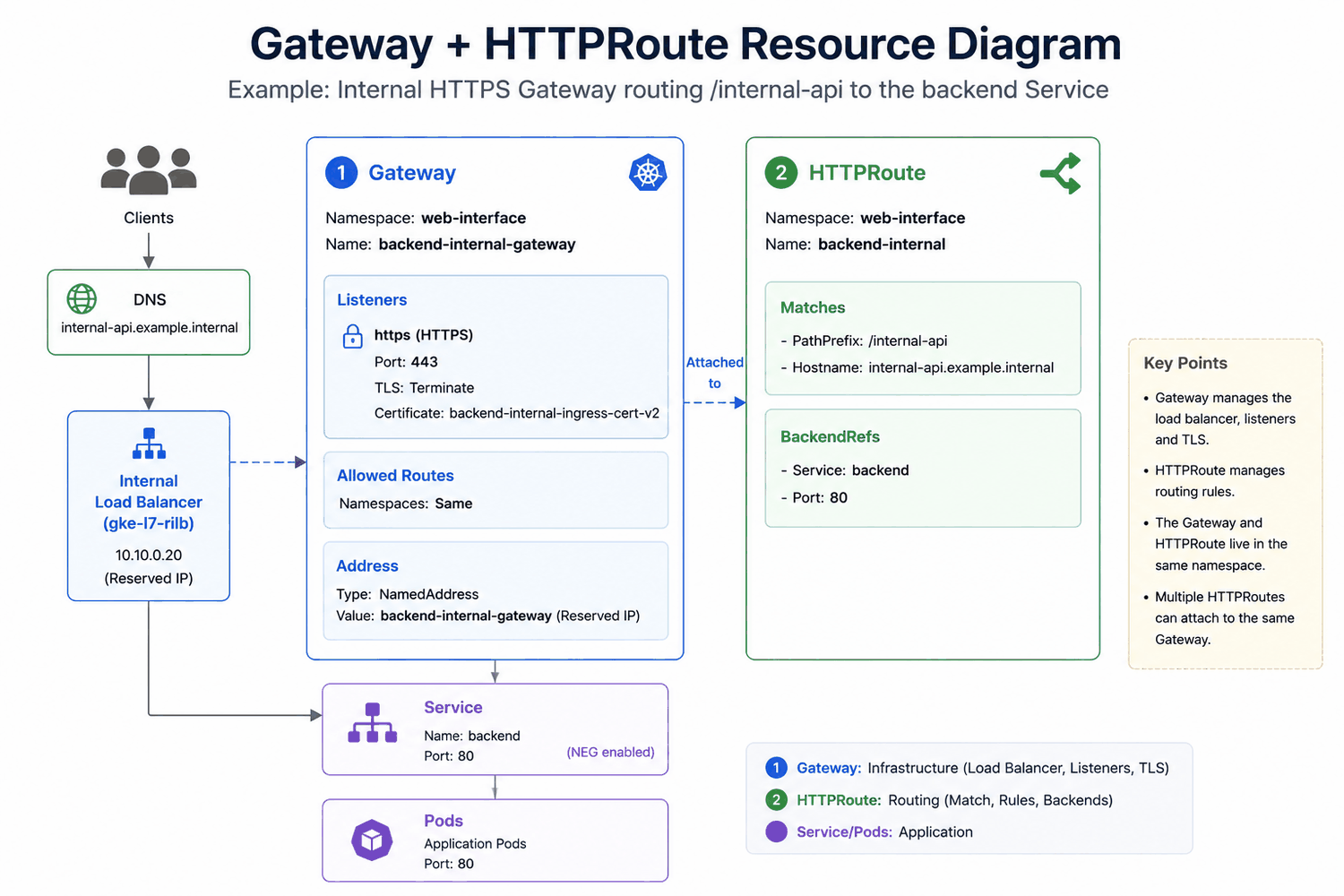
The diagram shows a hostname-specific route because many production migrations eventually add explicit hostnames. If the source Ingress had no host field, omit hostnames in the first Gateway API version unless you intentionally want to narrow the accepted hostnames during the migration.
Terraform normally spans two providers for this migration:
| Resource type | Examples | Terraform provider |
|---|---|---|
| Kubernetes resources | Gateway, HTTPRoute, Gateway-facing Service, TLS Secret, GCPBackendPolicy, HealthCheckPolicy |
Kubernetes provider, often with kubernetes_manifest |
| Google Cloud resources | Reserved internal IP, Cloud DNS record, firewall rules | Google provider |
Reserved Internal IP
Reserve the internal frontend IP first. This makes DNS cutover and rollback easier than relying on an ephemeral address.
resource "google_compute_address" "internal_gateway" {
  project      = var.project
  name         = var.gateway_address_name
  address_type = "INTERNAL"
  purpose      = "SHARED_LOADBALANCER_VIP"
  region       = var.region
  subnetwork   = var.subnetwork
}
The Gateway references the address resource name through NamedAddress. DNS uses the literal IP address from google_compute_address.internal_gateway.address.
TLS Secret
If the existing Ingress used a Kubernetes TLS Secret, the Gateway can reference the same Secret. Keeping the old Secret name is fine, even if it contains the word ingress, unless you have a separate reason to rename or rotate it.
resource "kubernetes_secret_v1" "gateway_tls" {
  metadata {
    name      = var.tls_secret_name
    namespace = var.namespace
  }

  data = {
    "tls.crt" = var.certificate
    "tls.key" = var.private_key
  }

  type = "kubernetes.io/tls"
}
Gateway
The Gateway defines the internal load balancer frontend, listener, TLS termination, and route attachment rules.
resource "kubernetes_manifest" "gateway" {
  manifest = {
    apiVersion = "gateway.networking.k8s.io/v1"
    kind       = "Gateway"

    metadata = {
      name      = var.gateway_name
      namespace = var.namespace
    }

    spec = {
      gatewayClassName = "gke-l7-rilb"

      addresses = [
        {
          type  = "NamedAddress"
          value = google_compute_address.internal_gateway.name
        }
      ]

      listeners = [
        {
          name     = "https"
          protocol = "HTTPS"
          port     = 443

          allowedRoutes = {
            namespaces = {
              from = "Same"
            }
          }

          tls = {
            mode = "Terminate"
            certificateRefs = [
              {
                group = ""
                kind  = "Secret"
                name  = var.tls_secret_name
              }
            ]
          }
        }
      ]
    }
  }
}
For an application-specific Gateway, allowedRoutes.namespaces.from = "Same" is usually enough because the Gateway and route live with the application. Use cross-namespace attachment only when you are intentionally designing a shared Gateway model.
One important GKE caveat: do not point the Gateway at a Service that is still referenced by an Ingress during the parallel validation period. Use a dedicated Gateway-facing Service that selects the same Pods, then retire the old Ingress path after cutover.
Application-Specific Or Shared Gateway
There are two common migration shapes:
| Design | What it means | When to use |
|---|---|---|
| Application-specific Gateway | Each application gets its own Gateway, frontend IP, listener, certificate reference, route, and Gateway-facing Service | Best for the first migration because it preserves the old per-application operating model |
| Shared Gateway | Multiple applications attach routes to one Gateway and usually share a frontend IP and listener model | Useful later, but it changes DNS ownership, certificate ownership, route boundaries, and failure domains |
For a low-risk migration, start with an application-specific Gateway. Shared Gateway consolidation is a separate architecture decision, especially if the old internal Ingresses used catch-all hostnames on separate IPs. Several catch-all routes attached to one shared Gateway will overlap unless you introduce explicit hostnames or non-overlapping path prefixes.
If a route attaches from the same namespace as the Gateway, allowedRoutes.namespaces.from = "Same" is usually enough. Cross-namespace route attachment requires the Gateway listener to allow it, and in some designs it also requires explicit cross-namespace reference handling.
HTTPRoute
The HTTPRoute carries the routing rules that previously lived inside the Ingress.
resource "kubernetes_manifest" "http_route" {
  manifest = {
    apiVersion = "gateway.networking.k8s.io/v1"
    kind       = "HTTPRoute"

    metadata = {
      name      = var.http_route_name
      namespace = var.namespace
    }

    spec = {
      parentRefs = [
        {
          name        = var.gateway_name
          namespace   = var.namespace
          sectionName = "https"
        }
      ]

      rules = [
        {
          matches = [
            {
              path = {
                type  = "PathPrefix"
                value = "/internal-api"
              }
            }
          ]

          backendRefs = [
            {
              name = var.gateway_service_name
              port = var.service_port
            }
          ]
        }
      ]
    }
  }
}
This example omits hostnames because the source Ingress had no host field and therefore accepted any hostname that reached the load balancer. If your current Ingress uses explicit hosts, add the same hostnames to the route.
The path translation is worth reviewing carefully. An Ingress path such as /internal-api/* normally becomes:
Do not copy the trailing wildcard blindly into the HTTPRoute.
Gateway-Facing Service
GKE Gateway routes to Pod endpoints through standalone Network Endpoint Groups. The safest migration pattern is to create a dedicated Service for the Gateway path while the old Ingress remains live. That Service can keep the same port and selector as the original Service, but it has its own name and lifecycle.
Avoid hand-managing the cloud.google.com/neg annotation on a Service that is part of Gateway reconciliation unless you have verified that the exact pattern is supported for your GKE version. Let the Gateway controller own the NEG behavior it needs.
resource "kubernetes_service_v1" "gateway_application" {
  metadata {
    name      = var.gateway_service_name
    namespace = var.namespace
  }

  spec {
    port {
      port        = var.service_port
      target_port = var.target_port
    }

    selector = var.selector
  }
}
If the original Service is no longer referenced by Ingress at the time of migration, you can reuse it deliberately. During a staged migration, though, a separate Gateway-facing Service keeps controller ownership clean and rollback simpler.
Backend Policy Migration
Older GKE Ingress deployments often rely on BackendConfig through Service annotations. Gateway API does not use that old Service-to-BackendConfig path. Migrate only the settings that the application actually depends on, and attach the new policies to the Gateway-facing Service.
Common mappings are:
| Existing behavior | Gateway-style replacement |
|---|---|
| Backend timeout | GCPBackendPolicy |
| Custom health check | HealthCheckPolicy |
| Cloud Armor policy | Gateway-compatible backend policy configuration |
| IAP | Gateway-compatible backend policy configuration where supported |
No custom BackendConfig |
No policy required by default |
For example, a previous BackendConfig timeout can become a GCPBackendPolicy targeting the Gateway-facing Service:
resource "kubernetes_manifest" "backend_policy" {
  manifest = {
    apiVersion = "networking.gke.io/v1"
    kind       = "GCPBackendPolicy"

    metadata = {
      name      = "${var.gateway_service_name}-policy"
      namespace = var.namespace
    }

    spec = {
      default = {
        timeoutSec = var.timeout_seconds
      }

      targetRef = {
        group = ""
        kind  = "Service"
        name  = var.gateway_service_name
      }
    }
  }
}
GCPBackendPolicy and HealthCheckPolicy resources must live in the same namespace as the Service they target, and each policy targets a single backend resource. A Service can have only one attached GCPBackendPolicy, so combine timeout, session affinity, logging, Cloud Armor, and similar backend settings into one policy when needed.
After the behavior is represented by Gateway-compatible policies, remove the old cloud.google.com/backend-config annotation from Services that no longer need the Ingress path. Leaving stale annotations around makes future debugging harder.
What Usually Breaks
Most Gateway migrations fail in small, predictable places rather than in the main Gateway manifest.
Watch for:
- a Gateway route targeting the same Service that an Ingress still references
- a stale
cloud.google.com/backend-configannotation that no longer matches the policy model - a proxy-only subnet still using
INTERNAL_HTTPS_LOAD_BALANCER - a
NamedAddressvalue set to the literal IP address instead of the reserved address resource name - an HTTPRoute with
hostnamesthat does not match the hostname used in validation - a copied Ingress wildcard path such as
/internal-api/*instead ofPathPrefix/internal-api - a default health check path that does not return success for the application
- a DNS TTL that is too high for a comfortable cutover window
DNS Cutover
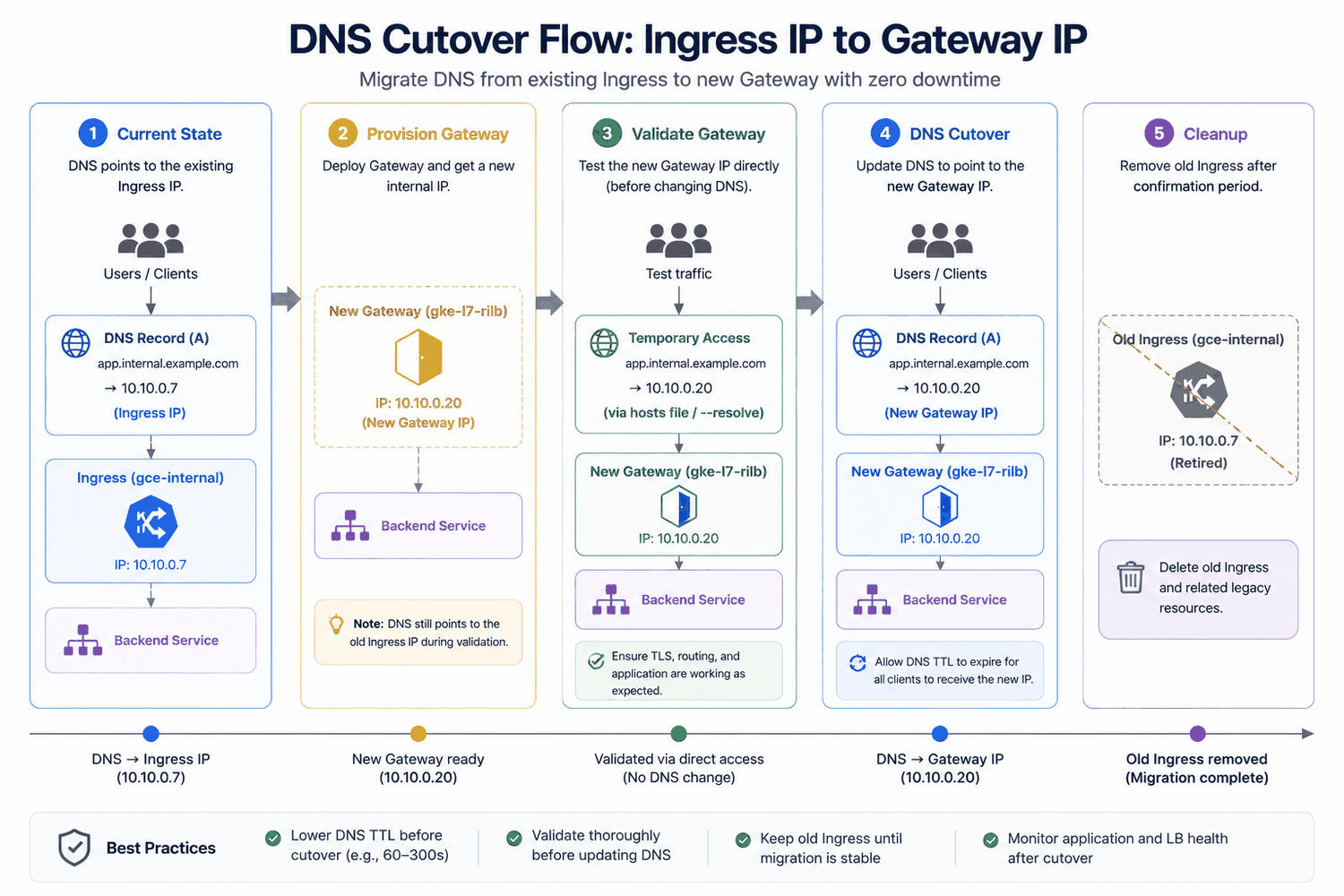
The DNS change is the real production cutover. The Gateway usually receives a different frontend IP from the old Ingress, so validate the new IP before moving the application hostname.
Before cutover:
During validation, both load balancers can exist:
| Resource | Frontend IP | Production DNS |
|---|---|---|
| Existing Ingress | Existing internal IP | Active |
| New Gateway | New reserved internal IP | Not active yet |
Use curl --resolve so the request uses the real hostname while connecting to the new Gateway IP:
curl -k --resolve internal-api.example.internal:443:<GATEWAY_IP> \
  https://internal-api.example.internal/internal-api/
That validates:
- connectivity to the Gateway frontend IP
- TLS termination
- hostname matching, if the route uses
hostnames - HTTPRoute path matching
- Service resolution
- backend reachability
An application-level response such as 401 Unauthorized can still be a successful infrastructure test because it proves the request reached the application.
A temporary validation DNS record can also be useful:
Use this only when the route and certificate also accept the temporary hostname. If the HTTPRoute only matches the production hostname, curl --resolve is usually the cleaner validation method because it keeps the hostname unchanged while directing traffic to the new IP.
When validation succeeds, update the DNS A record:
resource "google_dns_record_set" "application" {
  project      = var.project
  managed_zone = var.dns_zone_name
  name         = var.hostname
  type         = "A"
  ttl          = var.dns_ttl

  rrdatas = [
    google_compute_address.internal_gateway.address
  ]
}
If the current TTL is high, reduce it before the planned cutover and wait for the old TTL to expire. After the migration is stable, increase it again if that matches your DNS standards.
After the DNS change, verify resolution from a client that uses the relevant private zone:
The answer should return the Gateway frontend IP.
Validation Checklist
Validate the migration at several layers.
Terraform
Review the plan for unintended replacement or deletion, especially around DNS records, reserved addresses, proxy-only subnets, Services, Secrets, and old Ingress resources.
Gateway And Route
kubectl get gateway -A
kubectl get httproute -A
kubectl describe gateway <GATEWAY_NAME> -n <NAMESPACE>
kubectl describe httproute <HTTP_ROUTE_NAME> -n <NAMESPACE>
Look for healthy status conditions such as Accepted=True, Programmed=True, and ResolvedRefs=True, depending on the resource and controller output.
If ResolvedRefs=False, inspect the Service name, port, namespace, Gateway reference, listener section name, and TLS Secret references before looking deeper into the load balancer.
You can also confirm the assigned address:
Service And Endpoints
kubectl get service <GATEWAY_SERVICE_NAME> -n <NAMESPACE>
kubectl get endpointslice -n <NAMESPACE> \
  -l kubernetes.io/service-name=<GATEWAY_SERVICE_NAME>
Confirm that the Gateway-facing Service selector matches the Pods, healthy endpoints exist, the Service port matches the route backend port, and the Pods listen on the expected target port.
Policies
kubectl describe gcpbackendpolicy <POLICY_NAME> -n <NAMESPACE>
kubectl describe healthcheckpolicy <POLICY_NAME> -n <NAMESPACE>
Confirm that each policy targets the intended Service and is accepted by the controller.
Traffic
curl -k --resolve <HOSTNAME>:443:<GATEWAY_IP> https://<HOSTNAME>/<PATH>
curl -k https://<HOSTNAME>/<PATH>
Where possible, test normal requests, authenticated requests, long-running requests, upload or download paths, and application-specific API routes.
Rollback And Cleanup
Plan rollback before DNS changes.
If problems appear after cutover:
- Move the DNS A record back to the old Ingress IP.
- Confirm DNS resolution from a client that uses the relevant private zone.
- Validate traffic through the old Ingress.
- Inspect the Gateway, route, Service, endpoints, and policies before retrying.
Do not delete the old Ingress immediately after DNS moves. Keep it until application traffic is healthy, logs are clean, and the team is comfortable with the new path. If the old Ingress and new Gateway exist at the same time, keep their Services separate even when those Services select the same Pods.
After the Gateway is stable, cleanup may include:
- old Ingress resources
- replaced
BackendConfigresources - stale
cloud.google.com/backend-configService annotations - obsolete
FrontendConfigresources - the old Ingress-facing Service, if it was kept only for rollback
- old static addresses that are no longer required
- temporary validation DNS records
- retired Terraform modules for the old Ingress path
Run a final Terraform plan before cleanup and confirm that only intended legacy resources are being removed.
Lessons Learned
The biggest migration lesson is that a Gateway migration is mostly an operational change, not a YAML translation exercise.
The details that matter most are:
- preserve behavior before redesigning architecture
- use
gke-l7-rilbfor internal GKE L7 load balancing - ensure the proxy-only subnet uses
REGIONAL_MANAGED_PROXY - use
NamedAddresswith the reserved address resource name - point DNS at the actual reserved IP address
- convert wildcard Ingress paths intentionally
- use a dedicated Gateway-facing Service while Ingress and Gateway run in parallel
- migrate only backend policies that are truly required
- retain the old Ingress until rollback is no longer needed
Gateway API gives you a cleaner long-term model, but the first migration should be intentionally modest. Once the application-specific Gateway is running reliably, you can evaluate shared Gateways, central listener ownership, route delegation, and other platform improvements as separate architecture decisions.
The same discipline applies beyond GKE as well. AWS, Azure, RKE2, and vanilla Kubernetes environments differ in implementation details, but the durable pattern is the same: separate frontend infrastructure, routing, and backend policy, then migrate production traffic with validation and rollback built in.